


Classic Drum: play drums
4.61.21K Reviews
App Specs
- Version
- 8.54.10
- Updated On
- License
- Free
- Downloads
- 10,000,000+
- Developer
- Kolb Apps
- Categories
- Music
- Platform
- Android, iOS
Screenshots
 Analysis by AppCompare
I tend to enjoy music games most when they let me do something with rhythm rather than simply watch notes go by. That is the appeal of Classic Drum: play drums: it turns tapping a screen into a hands-on way to try drum parts, play around with a beat, or pass a few spare minutes making noise. I wouldn’t confuse it with a physical drum kit or a full course in percussion, but as a portable music game from Kolb Apps, it gives curious beginners and casual players a simple place to start.
The game has been available since May 14, 2012, and its current version is 8.50.4. It is free to download, rated for Everyone, and offers optional in-app purchases from $0.99 to $18.99 per item. Its 4.5 average from around 122,000 ratings and more than 10 million installs suggest it has found a broad audience, though popularity alone doesn’t guarantee it will suit every player. The key question is whether tapping virtual drums fits the kind of practice or play you want.
Making a touchscreen feel like a drum kit
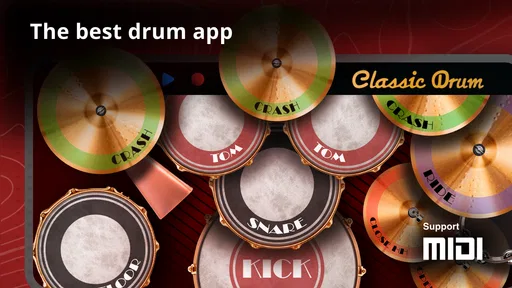
If you've ever found yourself drumming on your desk or tapping your feet to the beat, you might have dreamed of playing the drums for real. Well, now you can bring that dream to life with Classic Drum: play drums, a fantastic app that turns your mobile device into a full-fledged drum kit. I’ve been playing around with it, and let me tell you, it’s quite the experience.
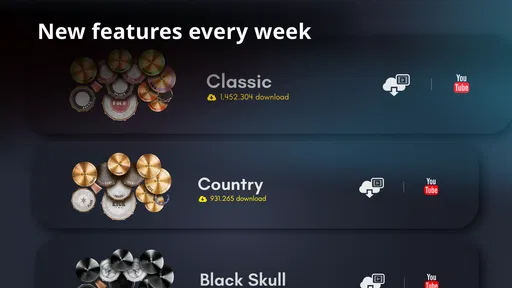
So, what’s the deal with Classic Drum? First off, the app is loaded with a multitude of features that make it feel like you’re behind an actual drum set. You get access to different drum kits, and each kit comes with its unique sound. Whether you’re into rock, jazz, or something more exotic, there’s a kit for you.
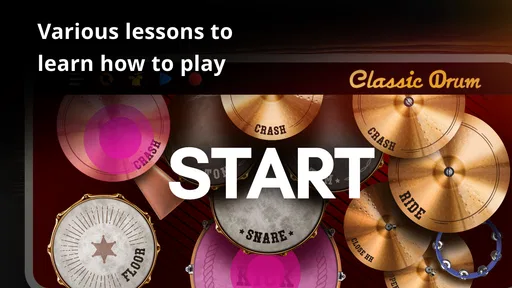
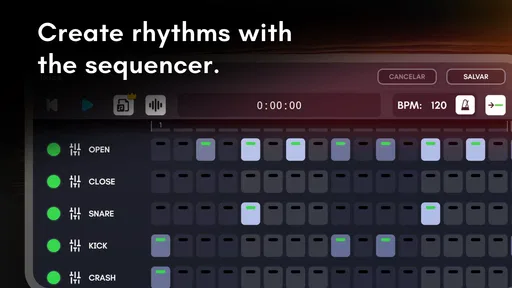
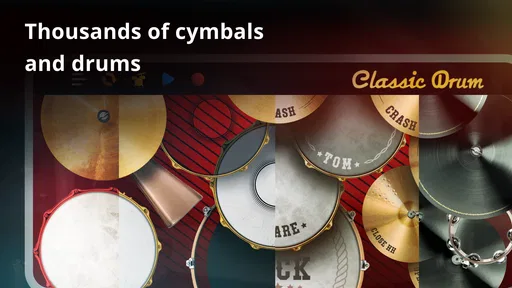
One of the coolest features has to be the ability to customize your drum kit. You can mix and match different drums and cymbals to create a sound that’s totally your own. Plus, there are tons of tutorials to help you get started, which is super helpful if you’re new to drumming.
User Interface and Experience
The interface is sleek and intuitive. As soon as you open the app, you're greeted with an easy-to-navigate menu. Everything feels smooth, and the response time is impressive. I didn’t experience any lag, which is crucial when you’re trying to keep up with a beat.
One thing I really appreciate is the layout. The drums are spaced out nicely, allowing for quick and precise tapping. It’s all about that muscle memory, you know?
Worth Reading Before You Choose

EA SPORTS FC Mobile 26 Is a Bigger Football Game, but It Takes Time

Flipboard Shows What News Apps Must Do Beyond the Feed

Switching to Android Auto Means Rethinking Your Driving Routine

Google Calendar Makes a Crowded Week Easier to Manage

Ludo King Makes the Most of the Minutes Between Plans

Baby Panda World Brings Quick Play to Modern Phones, but Its Game Library Feels Busy
Sound Quality
The sound quality is where this app really shines. The samples are high-quality and capture the essence of real drums. When you hit the snare or crash a cymbal, it sounds crisp and authentic. There’s a depth to the sound that you don’t usually get with other apps.
And if you’ve got a good pair of headphones, you’re in for a treat. It almost feels like you’re sitting in a music studio with a professional drum set in front of you.
Recording and Sharing Your Beats
Another nifty feature is the recording capability. You can record your sessions and save them within the app. This is perfect for tracking your progress or sharing your beats with friends. You can even export your recordings and share them on social media or with fellow musicians.
It’s a great way to showcase your skills and get feedback from others. Plus, it’s motivating to see how you’ve improved over time.
Practice Makes Perfect
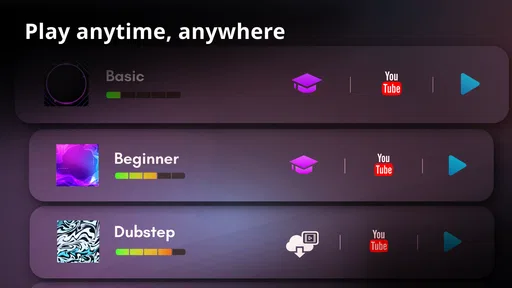
If you’re looking to improve your drumming skills, Classic Drum has got you covered. The app includes a variety of practice modes and exercises that cater to different skill levels. Whether you’re a beginner or a seasoned drummer, there’s something for everyone.
The tutorials are comprehensive and easy to follow, making it a great tool for learning new techniques or polishing your skills.
When a virtual kit fits—and when it doesn’t
While the app is generally fantastic, there are always areas for improvement. Some users have mentioned they’d love more drum kits or additional customization options. But honestly, with the regular updates the developers roll out, I wouldn’t be surprised if these features are added soon.
Also, it can be a bit tricky to play fast-paced songs on a smaller screen, so having a tablet might enhance the experience.
Overall, Classic Drum: play drums is a solid app for anyone looking to dive into the world of drumming. It’s fun, educational, and offers a realistic drumming experience right from your phone. So, if you’re ready to unleash your inner drummer, give it a shot. Who knows? You might just find your new favorite hobby!
What you can realistically practise
The most useful way I’ve found to think about this game is as a portable rhythm sketchpad. A touchscreen kit can help you experiment with where a kick, snare, or cymbal might land in a pattern, and the recording option gives you a way to listen back instead of relying on memory. That makes it handy for capturing a rhythm idea on a commute or while waiting for a lesson, then deciding later whether the groove is worth developing.
There is an important boundary, though: tapping glass is not the same physical task as playing acoustic drums. The screen can help with timing and arranging hits, but it won’t teach the rebound of a stick, the force control of a pedal, or how to coordinate around a real kit’s dimensions. I’d use it to build musical ideas and get familiar with basic patterns, not as proof that I’m ready to play a drum set fluently.
A small routine that makes the screen more useful
For a practical session, I’d start with a simple pulse and keep the pattern deliberately sparse. Tap a steady kick-and-snare figure, add a cymbal only when the core rhythm feels settled, and record a short pass. On playback, listen for whether the beat stays even and whether extra hits actually improve it. This is more revealing than tapping as quickly as possible, and it makes the app’s recording feature useful as a self-check rather than just a way to save a performance.
Another helpful habit is to practise one change at a time. For example, keep the main beat steady while trying a different cymbal placement, then compare recordings. If I change the whole pattern at once, it’s harder to tell what made it feel better or less stable. Customizing the kit can also be approached this way: adjust the sound choices to suit the idea, but avoid treating a new kit as a substitute for improving timing.
Where it sits beside other music options
Compared with rhythm games built around hitting prompts on time, this is appealing when I want to choose the pattern myself and explore a kit rather than follow a fixed sequence. Compared with a dedicated drum-learning course, it is lighter and more immediate, but it cannot replace structured instruction or hands-on feedback. And against a real electronic kit, the phone wins on convenience and space while losing the natural spacing, physical response, and expressive control that make drumming feel like drumming.
That comparison helps set expectations. If your goal is to casually try beats, make a quick recording, or introduce a child to the idea of a drum pattern, a free game rated for Everyone is an easy starting point. If you need a serious practice tool for rehearsing a band part, developing stick technique, or reliably performing at speed, I’d choose a physical instrument or a more focused learning setup instead.
Everyday use, without disturbing the room
A realistic use case is a quiet evening when I have a rhythm in mind but don’t want to set up an instrument or make noise for anyone nearby. I can open the game, try the beat with headphones, record a pass, and decide whether it has potential. This sort of short session is where a phone-sized kit makes sense: it removes setup and makes experimentation easy. Headphones also let me concentrate on the samples without turning the room into an impromptu rehearsal space.
For longer sessions, comfort becomes a bigger factor. Holding or positioning a phone while reaching across a compact layout can make repeated playing awkward, and a tablet may give more room for taps, as the original experience suggests. I would also take breaks rather than forcing a long practice session on a small screen. The convenience is real, but it doesn’t make the physical limitations disappear.
Choosing a kit and managing expectations
Different kit sounds can make the same rhythm feel more suitable for one musical mood than another. I’d try a few options before settling on a sound for a recording, then keep that choice consistent while working on the pattern. Switching sounds constantly is fun for exploration, but it can make it difficult to judge whether a rhythm itself is working. Customization is best treated as a creative aid, not a guarantee that every combination will match a particular song or style.
The free entry point is useful for trying the basic experience before spending anything. Optional purchases range from $0.99 to $18.99 per item, so I’d first decide whether the available kit, practice, and recording features already meet my needs. I wouldn’t buy anything just to solve a timing or technique problem: those are better addressed by slowing down, simplifying the pattern, and listening back. The game’s minimum operating-system requirement is version 7.0, a practical detail to check if you’re using an older device.
Who will enjoy it most
I’d recommend it most to curious beginners, casual music makers, and anyone who likes tapping along and wants a more deliberate way to explore beats. It can also suit a musician who needs a quick place to rough out a rhythm away from their usual equipment. The tutorials may help newcomers find a starting point, while recording makes it easier to review an idea rather than letting it vanish once the session ends.
I’d steer away from it if you expect a touchscreen to reproduce the touch and coordination of a real kit, or if you need a metronome-led training plan, detailed coaching, or dependable rehearsal for a live performance. It’s also a less comfortable choice for fast patterns on a small phone. Those aren’t reasons to dismiss the game; they’re simply the points where another tool is better suited to the job.
A sensible way to decide
If you’re unsure whether it’s for you, try one short session with a clear goal: make a basic beat, record it, and listen back. If the process feels enjoyable and helps you shape an idea, the game is doing something useful. If you mainly want physical drumming technique, you’ll probably outgrow a virtual kit quickly and should look toward an instrument or guided lessons. Its appeal is the low-friction chance to play with rhythm wherever you are, not a promise to replace every other way of learning drums.
With an average rating of 4.5 and around 1,200 written reviews, Classic Drum: play drums has earned plenty of attention as a music game. I’d treat those figures as context, not a reason to assume it will be perfect for me. My recommendation is straightforward: try it if you want a convenient, playful space to tap out and record ideas; skip it if realistic technique or structured training is your priority. For the right expectation, it can make a spare few minutes feel musical.
Pros
- Realistic drum sounds enhance the experience.
- Wide variety of drum kits to choose from.
- Multiplayer mode adds a social element.
- Customizable interface for personal preferences.
- Offline mode available for practice anywhere.
Cons
- Ads can be intrusive during gameplay.
- Limited free content without in-app purchases.
- Requires significant storage space on device.
- Some users report occasional app crashes.
- Learning curve for beginners can be steep.
FAQs for Classic Drum: play drums
What features does Classic Drum: play drums offer?
Classic Drum: play drums includes a wide variety of features to enhance your drumming experience. It offers multiple drum kit options, high-fidelity sound samples, and customizable drum pads. The app also includes tutorials and a play-along feature, allowing users of all skill levels to improve their drumming techniques.
Is Classic Drum: play drums suitable for beginners?
Yes, Classic Drum: play drums is designed to accommodate all skill levels, including beginners. It includes an easy-to-follow tutorial section and practice exercises. The intuitive interface makes it simple for newcomers to start playing without feeling overwhelmed, while still providing depth for more advanced users.
Can I customize the drum kits in Classic Drum: play drums?
Absolutely, Classic Drum: play drums allows for extensive customization. Users can select from various drum kits or create their own setup by choosing different drum sounds and arrangements. This flexibility ensures that you can tailor the app to match your musical style and preferences.
Does Classic Drum: play drums require an internet connection?
Classic Drum: play drums primarily functions offline, so you can play without an internet connection. However, certain features like accessing new drum kits or sharing your sessions might require you to be online. This allows you to practice and play anywhere, without worrying about connectivity.
How does Classic Drum: play drums enhance my learning experience?
Classic Drum: play drums enhances learning by providing interactive tutorials and play-along tracks. These features allow users to practice in real-time and improve their timing and rhythm. The app also offers feedback and progress tracking, helping you to continuously refine your drumming skills.


